A Dank Material Shell plugin for controlling the user's Tailscale connection.
 vybe
93b257ba5d
vybe
93b257ba5d
Replace inline shell command building in QML with calls to parseClipboardDetection, parseStatusResult, buildToggleCommand, and buildCopyCommand. This centralizes sanitization logic and removes duplicated try/catch and ternary blocks from the UI layer. |
||
|---|---|---|
| docs/agents | ||
| resources | ||
| tailscalectl | ||
| test | ||
| .gitignore | ||
| AGENTS.md | ||
| LICENSE | ||
| README.md | ||
Tailscale Widget Plugin for Dank Material Shell
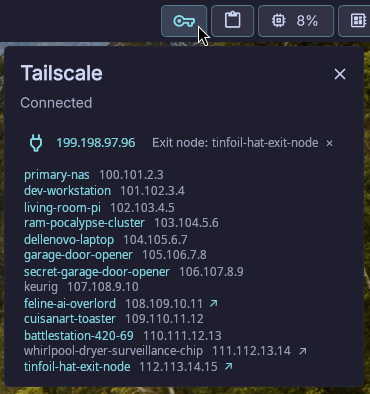
A lightweight widget plugin that shows Tailscale connectivity status on the Dank Bar with quick controls for toggling connection, switching exit nodes, and copying peer addresses.
Features
- Status icon in the bar —
vpn_keywhen connected,vpn_key_offwhen disconnected - Right-click to toggle Tailscale on/off
- Left-click to open a popout showing:
- Your current Tailscale IP
- Active exit node (with clear button)
- Peer list with hostnames and IPs
- Click-to-copy any hostname or IP to clipboard
- Exit node selection — click
↗on any exit-node-capable peer to route through it - Auto-refresh — status polls every 5 seconds
- Toast notifications for all errors
Requirements
- Dank Material Shell installed and running
tailscaleCLI available onPATH- A clipboard tool (
dms,wl-copy, orclipmanctl)
Installation
-
Clone or copy this repository so that the
tailscalectl/directory is available:git clone <repo-url> -
Place the
tailscalectl/directory into your DMS plugins directory:mv tailscalectl ~/.config/dankmaterialshell/plugins/The directory must contain:
tailscalectl/ ├── plugin.json ├── TailscaleWidget.qml └── lib.js -
Reload the plugin:
dms ipc call plugins reload tailscalectl -
The Tailscale icon should appear on your Dank Bar. If connected, it shows a filled key icon; if disconnected, an outlined key icon.
Usage
| Action | How |
|---|---|
| Toggle connection | Right-click the bar icon |
| Open popout | Left-click the bar icon |
| Copy hostname/IP | Click the text in the peer list |
| Set exit node | Click ↗ next to an exit-node peer |
| Clear exit node | Click × next to "Exit node: ..." or click ↗ on current node |
Plugin Manifest
{
  "id": "tailscalectl",
  "name": "Tailscale",
  "description": "Tailscale status and controls on the Dank Bar",
  "version": "0.1.0",
  "author": "John Morris & Vybe (AI Slop... er... Coding Assistant)",
  "icon": "vpn_key",
  "type": "widget",
  "component": "./TailscaleWidget.qml",
  "permissions": ["settings_read", "settings_write", "process"]
}
Testing
node --test test/lib.test.js
License
See LICENSE.